A home office goes wrong one small thing at a time: a chair an inch high, a screen six inches low, a keyboard your wrists have to bend to reach. This is the sheet that catches all of it in one pass.
Work from the floor up, in this order: chair, desk height, keyboard, monitor, floor, then the way you move through the day. Fixing them out of order wastes the work — a desk height measured from a badly set chair is the wrong number, and a screen set against a wrong desk height is wrong twice. The checklist below is free to print, and the PDF is the same thirty checks with nothing to sign up for.
Both are free and nothing is gated — no email, no sign-up, no account. The PDF is the same checklist, branded, on three letter-size pages.
Deskstance · deskstance.com
Ergonomic Home Office Setup Checklist
Thirty checks, in the order that fixes things fastest. Print it, tick it, keep it in the drawer.
Work top to bottom. The chair comes before the desk, the desk comes before the screen, and the screen comes before anything you buy. Every check below is phrased so you can answer it yes or no while sitting in your own setup.
1. Chair and seat
Set the chair first. A desk height measured from a badly set chair is the wrong number.
Feet flat on the floor, or on a footrest if the desk will not go low enough.
Thighs and hips supported and roughly parallel to the floor.
Back fully supported, with the lumbar support actually touching your lower back.
Elbows in close to the body and bent between 90 and 120 degrees.
Shoulders relaxed, upper arms hanging normally at your sides.
Head level and forward facing, in line with your torso.
2. Desk height - the two numbers
Both numbers are elbow heights, measured floor to the underside of your forearm with shoulders relaxed.
Seated height set to your seated elbow height, measured with your feet already flat.
Standing height set to your standing elbow height, measured in the shoes you work in.
Desktop thickness subtracted from both figures if you bought a frame rather than a finished desk.
Both numbers saved as presets, so the desk is one button rather than a guess.
Walking pad thickness added to the standing number if a pad lives under the desk.
3. Keyboard and mouse
OSHA puts the elbows at about the same height as the keyboard, with the forearms approximately parallel with the floor.
Keyboard at elbow height, so your forearms sit roughly parallel to the floor.
Wrists straight - not bent up, down, or to either side while typing.
Mouse on the same surface and at the same height as the keyboard.
Nothing digging into the underside of your forearms or the heel of your hand.
Keyboard tray drop, if you use one, added back on top of the desk height.
4. Monitor
Desk height is set by your elbows and screen height is set by your eyes. They are independent, which is why a correct desk often still leaves the screen too low.
Top line of the screen at or just below eye level.
Screen between 20 and 40 inches from your eyes - roughly an arm's length.
Screen directly in front of you, within about 35 degrees of your line of sight.
Centre of the screen about 15 to 20 degrees below horizontal eye level.
Laptop raised to the same rule, with a separate keyboard and mouse once it is.
Second screen at the same height as the first, not stepped down beside it.
5. Floor, feet and shoes
Anti-fatigue mat under the standing spot, not under the chair.
Knees soft rather than locked straight.
Weight even on both feet, not parked on one hip.
Shoes you can stand in for an hour, and the desk height measured in them.
6. Movement through the day
OSHA's advice is to change working position frequently rather than to hold any one of them, including standing.
Position changed frequently through the day rather than held.
A few minutes of standing and walking built into each hour.
The first sit-stand weeks built up in short blocks instead of a full standing day.
Desk reminder or timer set, if you are the kind of person who forgets.
7. If your back is why you are reading this
Seated setup fixed first - most of a working day is still seated.
Standing swapped in before the ache starts, not after it arrives.
Lumbar support adjusted to your lower back rather than left at the factory position.
Anything specific, persistent, or getting worse taken to a clinician rather than to a desk.
Where the numbers come from
OSHA's Computer Workstations eTool is the source for the posture, keyboard and monitor figures above: elbows bent between 90 and 120 degrees, hands and forearms straight and roughly parallel to the floor, the top line of the screen at or below eye level, and a viewing distance of 20 to 40 inches.
BIFMA's G1 Ergonomics Guideline is the furniture-side document makers cite when they publish a height range - it is why a sit-stand desk is specified as a span rather than a single number. UPLIFT, for example, states that the V3 adjusts to meet ANSI/BIFMA G1-2013.
Every item on the sheet depends on the ones above it. The chair sets where your elbows are, your elbows set the desk height, the desk height sets where the keyboard lands, and your eyes — not your desk — set the screen height. That last one is the step most people skip, which is why a correctly specified desk so often still leaves someone looking down all day.
The two desk numbers come from the height calculator, which also does the desktop-thickness correction if you bought a frame rather than a finished desk. The posture detail behind checks one to six is on the posture page.
Where the figures come from
The keyboard, monitor and movement figures are OSHA's, from its Computer Workstations eTool: elbows bent between 90 and 120 degrees, forearms approximately parallel with the floor, the top line of the screen at or below eye level, 20 to 40 inches from your eyes, and the working position changed frequently through the day. Every source is linked at the bottom of this page and inside the PDF.
If your back is the reason
Section seven of the sheet is short on purpose. The single most useful thing it says is to fix the seated setup first: a sit-stand desk changes what you do for part of the day, and most of the rest of it is still spent in the chair. The back-pain desk page covers what to look for in the desk itself, the chair page covers the half of the day the desk does not, and a mat is what stops the standing half turning into its own ache.
What the checklist will not do is diagnose anything. If a pain is specific, persistent or getting worse, that is a clinician's question, not a furniture question — what the evidence actually supports is worth reading before you spend money on the strength of a claim.
What fixes the common faults
From the picks
The three things the checklist sends most people shopping for
A chair whose lumbar support adjusts to your back, an arm that separates screen height from desk height, and a mat for the standing half of the day.
Best chair for back pain
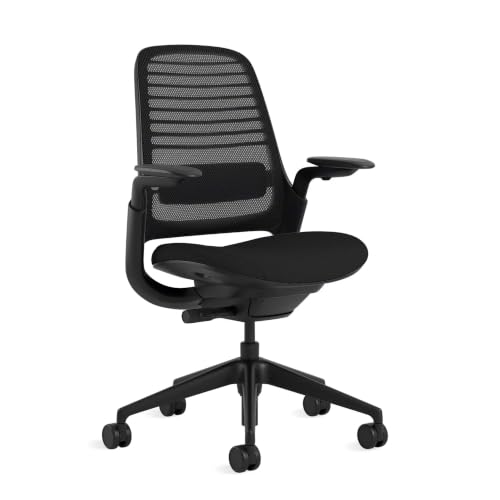
Steelcase Series 1
9.6 /10
Researched
Height-adjustable lumbar support is the feature that matters for a bad back, and this is the cheapest Steelcase that has it — behind a 400 lb rating and a 12-year parts-and-labor warranty.
#ad · Price as of November 13, 2026 · Affiliate disclosure for the link to Series 1
Best monitor arm
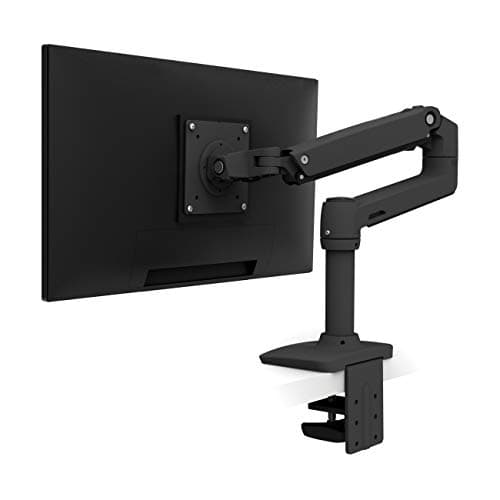
Ergotron LX Desk Monitor Arm
9.7 /10
Researched
The arm every other arm is copying. A 26 lb capacity, 13 inches of lift and a 10-year warranty, on a constant-force spring that holds position instead of drooping in month four.
#ad · Price as of November 13, 2026 · Affiliate disclosure for the link to LX Desk Monitor Arm
Best overall standing mat
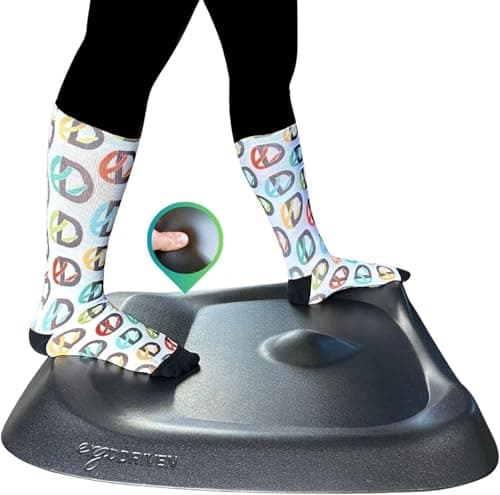
Ergodriven Topo
9.8 /10
Researched
A deliberately not-flat mat: the mounds and calf shelf exist to stop you standing still, which is the actual cause of standing-desk foot pain. Backed for sixteen years.
Do I have to give an email address to get the PDF?+
No. The download link is a plain file on this site — no form, no sign-up, no account. Print the page or take the PDF, whichever suits you.
What order should I set up a home office in?+
Chair, then desk height, then keyboard, then monitor, then the floor, then the way you move through the day. Each step sets the input for the next one, so working out of order means measuring against something you are about to change.
How high should my desk be?+
At your elbow height with your shoulders relaxed — one number standing, one number sitting. The calculator works both out from your height and applies the desktop-thickness correction.
Is this medical advice?+
No. It is general ergonomic setup information, built from OSHA's published workstation guidance. Anything specific, persistent or worsening belongs with a clinician.
Specs come from the maker's own spec pages and manuals; health claims from named medical institutions and published research; tax mechanics from IRS material. Where a figure isn't published, we say so rather than estimating it. Read the full method.