The short answer
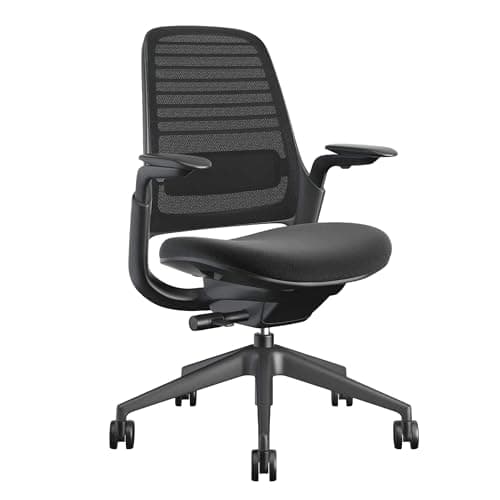
The Steelcase Series 1 is the cheapest chair in Steelcase's range that publishes height-adjustable lumbar support — support that slides up and down to land in the curve of your lower back rather than an average one — and that single adjustment is the reason to buy it. It is rated to 400 lb, its seat adjusts for both height and depth, the recline is weight-activated with an upright lock, and Steelcase covers it for twelve years on parts and labor in the US and Canada. One thing to get right before you order: the Amazon listing is floor-specific. The one we link is the Carpet Floors configuration in Licorice, and casters are matched to the floor you will actually roll on.
The case for the Series 1
Office chairs are sold on things that photograph well: mesh panels, headrests, armrests that move four ways. Almost none of that decides whether a chair is comfortable in hour six.
The Series 1 is interesting for a narrower reason. It is the entry point into Steelcase's contract line — the furniture sold to offices by the floor, where a chair has to survive a decade of strangers and a facilities budget that pays for repairs. That origin shows up in two published facts rather than in the styling: a 400 lb weight rating, and a twelve-year warranty that covers labor as well as parts.
It is also the chair this site already recommends in the back-pain ranking, for the adjustment covered below. This review is the longer version of that recommendation, including the parts that argue against it.
The published numbers
|
| Weight capacity | Rated to 400 lb |
| Lumbar support | Height-adjustable — slides up and down to sit in the curve of your lower back |
| Seat adjustment | Height- and depth-adjustable |
| Recline | Weight-activated, with an upright lock |
| Listed configuration | Carpet Floors, Licorice; wheels for carpet, weight-activated controls, back and arm support |
| Warranty | Limited 12-year warranty on parts and labor in the US and Canada |
Nobody here has sat in this chair for a working year. Every figure above is Steelcase's own published specification or a fact stated on the live Amazon listing, both cited at the foot of this page, and availability was confirmed before this review was written. Where a figure is not published — Steelcase does not state a seat-height range on the sources we cite — this page says so rather than filling the gap.
The adjustment you are paying for
Height-adjustable, not just present
Nearly every office chair has "lumbar support". Most of it is a fixed bulge moulded into the backrest at the height of an average torso. The Series 1's support slides vertically, which is what lets it land on the curve of a torso that is longer or shorter than that average — yours.
Why it matters is mechanical rather than mystical. The lumbar spine has an inward curve; sitting — especially sitting while concentrating — flattens it as you slide forward and your pelvis rotates back. Lumbar support exists to prop that curve back up, and a support sitting two inches above or below where your curve actually is will push on the wrong place for eight hours a day.
Seat depth adjustment is the quieter half of the same argument: if the front edge of the seat presses into the back of your knees, you will slide forward off the backrest, and the lumbar support you paid for will be touching nothing. Our chair buying guide ranks the four adjustments that matter in order, and the Series 1 publishes three of them.
None of this is medical advice, and a chair is not a treatment. If you are working through back pain, what the research does and does not support is the page to read first.
The listing variant that catches people out
This is the practical thing to get right, and it is easy to miss because it lives in the listing title rather than in the specifications.
The configuration we link is Steelcase Series 1, Carpet Floors, Licorice — the listing describes it as an ergonomic work chair with wheels for carpet. Office chair casters are matched to the floor they roll on: a hard-floor caster is softer so it does not scratch, a carpet caster is harder so it does not sink. Order a carpet chair for a hardwood or tile floor and you get a chair that rolls too readily and can mark the surface; order a hard-floor chair for a thick carpet and it drags.
So before you buy, look down. Then check that the variant you are adding to the cart names the floor you are actually on, and confirm the color while you are there — Licorice is the one on this listing, and Steelcase sells the Series 1 in a long color list that varies by configuration.
What it is like at a sit-stand desk
This site is about sit-stand setups, so the relevant question is not "is this a good chair" in the abstract. It is what happens to a chair in a setup where the desk moves.
You need a real chair, not a perch, for the seated half. Nobody stands all day — the pattern the research points at is alternating in fairly short blocks — so for most of a working day a sit-stand desk is a sitting desk, and the thing you are sitting on deserves the same scrutiny as the desk. A good chair makes the sitting half better; it does not replace the standing half.
The chair and the desk have to meet in the middle. Set your seated desk height from your elbows with the chair already adjusted — the calculator produces the seated number — and then check that your desk reaches it. This is where desks with a high floor cause trouble: a FlexiSpot E6 or E6 Pro drops to 23.6 inches and an UPLIFT V3 frame to 22.6, while a Secretlab MAGNUS Pro stops at 25.6. A chair cannot fix a desk that will not come down.
Armrests are the collision risk. On a desk that travels, the armrests are what meet the underside of the desktop, a keyboard tray or a drawer pedestal. If anything is mounted under your desk, check the clearance with the chair pushed in — the drawers page works through the same subtraction.
A stool is a third position, not a replacement. The Vari Balance Stool we rank runs 22 to 29 inches and rocks rather than holding you still. It is the right thing to perch on between standing bouts and the wrong thing to spend six hours in — the chair-versus-stool comparison says which to buy first, and the answer is usually the chair.
A 400 lb rating, and what that means
Steelcase rates the Series 1 to 400 lb. Most task chairs in this price band publish 250 to 300, so this is a genuine outlier and worth understanding rather than just noting.
A chair's weight rating is a structural claim about the base, the gas cylinder and the seat pan under normal use. It is not a comfort claim, and it is not a promise about seat width — a 400 lb rating tells you the chair will take the load, not that the seat is proportioned for every body. If you are shopping on capacity, this is one of very few chairs in this bracket that publishes a figure this high at all, which is itself the useful signal: contract furniture is specified for a working population rather than an average buyer.
The same logic runs through the office-desk ranking: the specifications that look over-engineered for one person are the ones that exist because the furniture was designed to fit a floor full of them.
Twelve years, parts and labor
Steelcase publishes a limited twelve-year warranty on parts and labor in the US and Canada. Both halves of that phrase do work.
Twelve years is long for a chair. The parts that fail on a task chair are the gas cylinder, the casters, the armrest mechanisms and the mesh or foam — all cheap individually, all annoying enough that most people replace the chair instead.
Parts and labor is the rarer half. A warranty that ships you a part and leaves you to fit it is a different product from one that covers the work. It is the clearest signal on this page that the Series 1 comes from a contract line, where a facilities manager expects a technician rather than a cardboard box.
Read it the way we read desk warranties — scope before length. Twelve years covering labor is worth more than a longer number that quietly excludes the mechanism.
The honest case against it
- It is not cheap, and the competition at half the price is not terrible. Plenty of chairs offer a fixed lumbar curve, a recline and a five-year warranty. If your back is fine and you sit for three hours a day, the Series 1's advantages are real but you may not feel them.
- The configuration list is a chore. Floor type, color, and the options that vary by listing mean this is a chair you have to read carefully before you buy — the opposite of a one-click purchase.
- No seat-height range is published on the sources we cite, so if you are unusually short or tall you cannot check the fit from the spec sheet the way you can with a desk. That is a real gap on a product whose whole argument is fit.
- It is a chair, not a posture fix. The most effective change for most desk workers is moving more often, which is a behavior rather than a purchase.
- It does not solve the standing half of your setup at all. If your feet and legs are what hurt, that has a different fix order, and it starts with two changes that cost nothing.
Who should buy it
Buy it if you sit for most of a working day, if you want lumbar support that can be placed on your own curve rather than an average one, if you want a warranty that covers labor, or if you need a published weight rating that most task chairs do not offer.
Do not buy it if what you actually need is a perch for the gaps between standing bouts — that is a stool — or if your desk cannot drop to a seated height in the first place, in which case the chair is not the thing to fix next. And if you have not yet sorted out the desk, the desk ranking is the better place to spend first: a good chair at the wrong desk height is still the wrong desk height.