The short answer
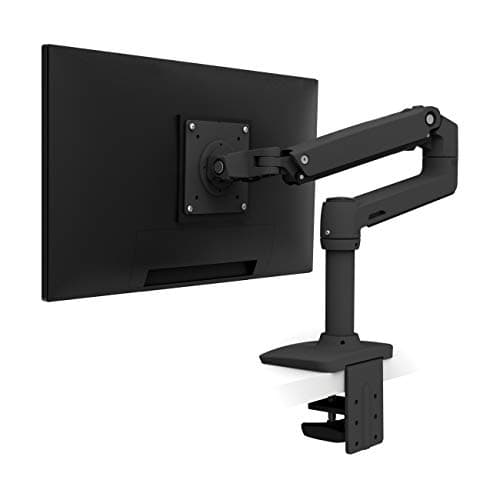
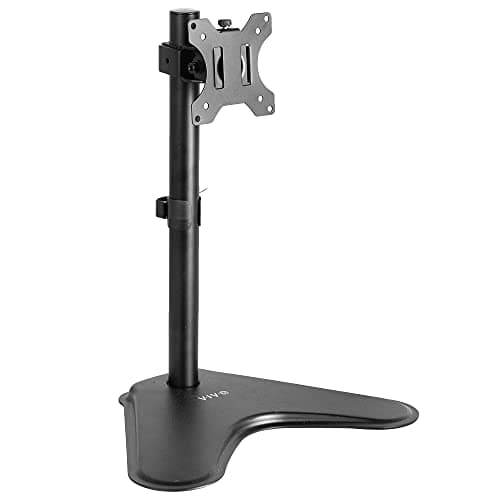
Buy the arm if your desk will take one. A clamped arm holds the screen out over the rear edge of the desk, which hands you back the several inches of depth a factory stand or a stand base consumes, and it repositions in seconds — which on a sit-stand desk means the screen can be at the right height standing and seated. The Ergotron LX publishes 26 lb of capacity, about 13 inches of lift and a ten-year warranty. Buy a freestanding stand if your desk has no clear clamp edge, is under about 0.6 inches thick, is glass, or is not yours to clamp to. The VIVO STAND-V001H takes a 22 lb screen on an 18-inch pole and asks nothing of the desk beyond a 15.5 by 11 inch footprint.
The actual difference
Both products hold a screen off the desktop. Where they differ is where the load goes.
A monitor arm clamps (or bolts through a grommet) to the rear edge of the desk, so the weight transfers into the desktop itself near the back — the stiffest part of it. The screen then cantilevers out over the desk on a jointed arm. Nothing sits on your working surface.
A monitor stand sits on the desktop on a base, holds a pole, and the screen attaches to the pole. It needs no clamp edge, no drilling and no permission. It occupies the desk.
That is the whole structural distinction, and everything below follows from it.
Desk depth is the real prize
The usual argument for an arm is adjustability. The better argument is depth.
A 27-inch monitor on its factory stand needs the base depth plus a comfortable viewing distance in front of it, and a comfortable viewing distance for a screen that size is roughly an arm's length. Add a keyboard and your forearms in front of that, and a 27.5-inch desktop is already fully committed with one screen on it. The arm removes the base entirely and pushes the panel back over the rear edge, which is often three to five inches of working depth recovered.
Where this gets decisive
Two screens. Put a second monitor on the desk and the geometry gets worse, not wider: both screens angle inward, which pulls their centers closer to you rather than further away. That is why
the two-monitor desk ranking sorts by depth rather than width, and why an arm is close to mandatory on a two-screen desk shallower than 30 inches.
A stand recovers some of this — the pole base is usually smaller than a wide factory stand — but the base is still on the desk. The VIVO single stand's base is 15.5 by 11 inches, which is real desktop.
The clamp edge is a specification
This is the part that decides the question for most people, and it almost never appears in an arm-versus-stand article.
A clamped arm needs a clear, flat, solid rear edge of workable thickness. Ergotron is explicit that the LX is the wrong product if your desktop is under about 0.6 inches thick or has no clear clamp edge. Five things take that edge away:
- A cable tray or modesty panel bolted across the back of the desk.
- A desk pushed flush to a wall with no reach behind it.
- A very thin laminated top — common on cheap desks and on converters.
- A glass or acrylic surface, which you should not be clamping to at all.
- A desk you do not own, in an office where drilling or clamping is not yours to do.
If any of those is true, the decision is made and it is not a compromise — it is the correct product for your desk. That is exactly why the stand ranking exists alongside the arm ranking.
Why this matters more on a sit-stand desk
On a fixed desk, you set the screen height once and forget it. On a sit-stand desk your eye line relative to the desktop changes every time you switch position — you are taller standing than your seated eye height plus the desk travel, and the correct screen height relative to the desk is genuinely different in the two positions.
An arm lets you fix that in a second. A stand lets you fix it if you are willing to loosen a pole clamp, which in practice means you set a compromise height and live with it.
There is a second sit-stand-specific point about load. On a two-leg frame the legs sit inboard of the ends of the top, leaving a span in the middle with nothing under it. A screen on a stand puts its weight into exactly that span; an arm transfers it to the stiff rear edge near a leg. The effect is perceived movement rather than failure, and how much the arm actually helps, and the two cases where it does not is worth reading before assuming it solves everything. The free fixes matter at least as much.
The two, side by side
|
| Mounting | Clamp or grommet to the rear desk edge | Freestanding on a 15.5" x 11" base |
| Desk requirements | Clear flat edge, about 0.6" thick or more | None |
| Capacity | 26 lb | 22 lb |
| Height travel | About 13" of lift | Adjustable along an 18" pole |
| Desktop consumed | None | The base footprint |
| Articulation | Full arm reach, tilt, pan, rotate | 15° tilt either way, 90° swivel, 360° rotation |
| Warranty | 10 years | 3 years |
| Repositioning | One hand, in seconds | Loosen the pole clamp |
The capacity figures are closer than people expect — 26 lb against 22 lb — so this is rarely the deciding spec for a single screen. The warranty gap is wide and real. The deciding row is "desk requirements".
Four checks that decide it
- Is there a clear rear edge? Reach behind the desk. If your hand does not fit, neither does a clamp.
- How thick is the top? Measure it. Under about 0.6 inches and Ergotron's own guidance rules the arm out.
- How deep is the desk? Under 30 inches, the depth an arm hands back is worth a lot. At 30 inches or more with one screen, a stand is genuinely fine.
- How heavy is the screen? Both products here are in the 22 to 26 lb range, which covers most panels. Above that, check the figure rather than assuming — Ergotron publishes that monitors over 20 lb can cut a dual arm's vertical range by up to 4.5 inches, which is the kind of detail that only shows up in the spec sheet. One dual arm or two singles follows from it.
The third option nobody mentions
There is a case neither product serves well: your screen is simply too low, you never want to move it, and you do not need articulation at all. For that, a fixed riser is the right answer and costs a fraction of either.
The VIVO 24-inch tabletop riser takes 44 lb — more than either product above — on a fixed shelf 23.8 by 10.3 by 4.6 inches, with no VESA mount, because the monitor sits on its own factory stand on top. No adjustment at all, which is both the limitation and the point. It is also the cheapest way to get a screen off a desk, which makes it the sensible pick inside a sub-$200 setup.
What a riser cannot do is help on a sit-stand desk, for the reason this page has been circling: it fixes the screen relative to the desktop, and the correct height relative to the desktop changes when you stand. The full ranking of stands and risers covers all four, including the extra-tall pole for a high eye line.
Neither product on this page has been used by anyone here. Every figure above is Ergotron's or VIVO's own published specification, cited below, and the method behind the scores is published in full.