The short answer
Buy a monitor arm first. The Ergotron LX takes a 26 lb screen through 13 inches of travel on a ten-year warranty, and on a sit-stand desk it does two things nothing else does: it gives you back the several inches of depth a factory stand eats, and it keeps the screen at your eye line in both positions instead of only one. Buy a mat second — the Ergodriven Topo is the cheapest item on this page and the one most likely to decide whether you are still standing in week three. Under-desk storage third, because a moving desk needs storage that moves with it or stays clear of it. A perch stool fourth, for the half-height position a chair and a standing desk both miss.
The order matters more than the list
Accessory roundups usually give you ten items with no sense of which one to buy. The order below is the whole point of this page, and it is sorted by how much each addition changes the daily experience per dollar — not by price and not by how much we like the product.
One thing worth saying before the list: none of this fixes a desk that does not fit you. If the height range does not cover both your seated and standing numbers from the height calculator, no accessory rescues it, and the choosing guide is the page you want instead.
1. A monitor arm
The highest-value object you can put on a sit-stand desk, and it is not close.
A screen on its factory stand has two problems on a moving desk. The base consumes the back several inches of your desktop — on a 27.5-inch-deep desk that is a meaningful share of your working depth. And the screen height is fixed relative to the desk, which means it can only be correct in one of your two positions, because your eye line relative to the desktop changes when you stand.
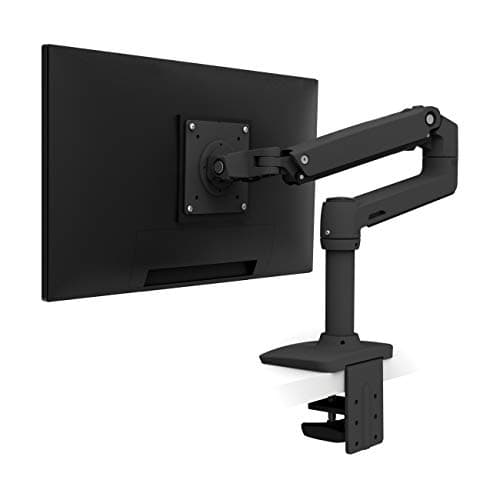
An arm fixes both. It holds the screen out over the rear edge and lets you reposition it in seconds, so you can set the height correctly standing and correctly seated. The Ergotron LX publishes 26 lb of capacity, 13 inches of lift and a ten-year warranty, which is why it tops the arm ranking too.
Check this before you order an arm
Your desktop needs a clear, flat, solid rear edge. Ergotron states the LX is the wrong product if your desktop is under about 0.6 inches thick or has no clear clamp edge — and a cable tray bolted across the back, a desk pushed flush to a wall, or a glass top all remove that edge. If you have no clamp edge, a freestanding stand is the fallback:
the arm-versus-stand comparison works through exactly when to switch.
Two screens is a separate decision — one dual arm on one clamp point or two singles on two. Ergotron's own figures settle it: monitors over 20 lb can cut a dual arm's vertical range by up to 4.5 inches.
2. A mat
The cheapest thing on this page, and the one with the highest chance of being the reason you keep standing.
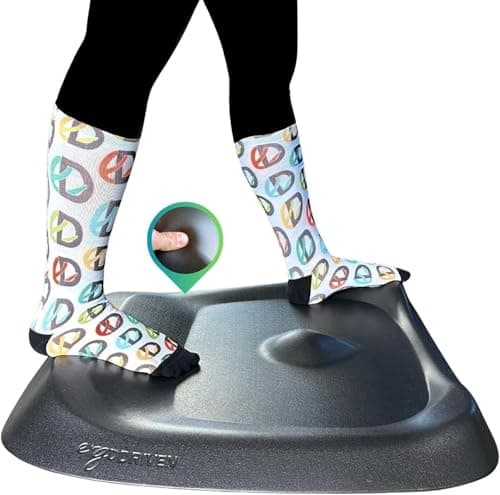
Standing still on a hard floor is uncomfortable within about forty minutes, and the discomfort is why people quietly stop raising the desk. A contoured mat changes that in two ways: it cushions, and more importantly it gives your feet somewhere to go. The Ergodriven Topo is 29 by 26.25 inches with terrain features up to 2.7 inches tall, in non-toxic polyurethane foam with no PFAs, PVC, plasticizers or added flame retardants, under a sixteen-year warranty.
That movement is the part that lines up with the advice. UT Southwestern's guidance on sit-stand working is explicitly to change positions, shift your weight and take short walk breaks every thirty minutes — and a contoured mat is a prompt to do the first two without thinking about it. A flat mat cushions but does not prompt, which is the whole argument in the Topo versus flat mat comparison.
The one real caveat: if you sit in a rolling chair at the same spot, a contoured mat is something you will shove out of the way a dozen times a day. Get a flat one. Whether you need a mat at all has a real answer rather than an assumed one.
3. Under-desk storage
A sit-stand desk has a problem a fixed desk does not: the desk moves and the things under it do not.
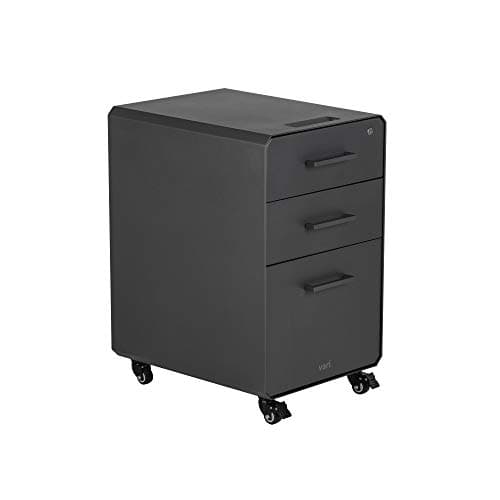
Anything bolted to the frame travels with the desk, which is fine. Anything standing on the floor has to be either low enough to clear the desk at its lowest setting, or on casters so you can move it. The Vari File Cabinet is the latter — three soft-close drawers, one lockable with two keys, letter or legal hanging files in the bottom drawer, roll-and-lock casters, and it ships fully assembled. It is 25.8 inches high, which matters because that has to clear your desk's floor height.
The in-drawer charging pass-through is the feature that is genuinely about sit-stand rather than about filing: a cable that leaves a closed drawer is a cable that does not get caught when the desk rises. The one-cable-to-the-wall method is the free version of the same idea and should probably come first, and the full storage ranking covers the other options.
The least obvious item here and the one that solves a problem people do not know they have.
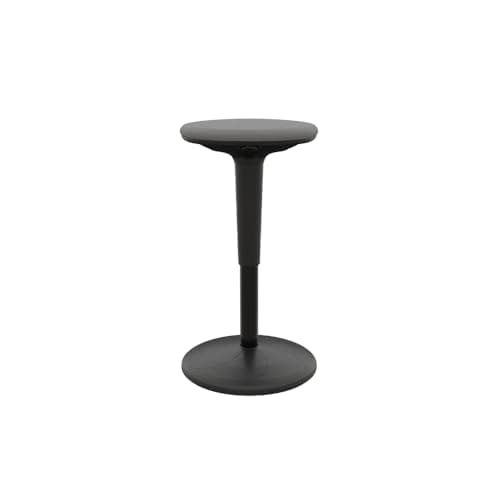
A sit-stand desk gives you two positions. Real workdays want three, and the missing one is the half-height perch — sitting high with your weight partly on your feet, which takes the load off your legs without putting you back into a full seated posture. The Vari Balance Stool runs 22 to 29 inches on a pneumatic lift, holds up to 275 lb, and sits on a rounded non-slip base that rocks, tilts and pivots rather than holding you still.
Be clear about what it is not. It has essentially no lumbar support, and Vari's own figures cap it at 29 inches, which is seated-to-low-perch range rather than standing-desk perch range. It is a third position, not a chair. Chair versus stool is a real decision, and if your back is the reason you are reading this, a proper task chair comes first.
The four, measured
|
| Ergotron LX monitor arm | 26 lb capacity | About 13" of lift | 10 years |
| Ergodriven Topo | 0.85" thick neutral, 2.7" peak | 29" x 26.25", 8 lb | 16 years |
| Vari File Cabinet | Three soft-close drawers, one lockable | 25.8" x 15.75" x 20.63" | Per Vari's published terms |
| Vari Balance Stool | 275 lb on a pneumatic lift | 22" – 29", 14.5" seat, 16.1 lb | Per Vari's published terms |
Three we would skip
Under-desk keyboard trays, on most desks. On a correctly set sit-stand desk, the desktop is your keyboard height — that is the point of adjusting the desk. A tray mainly helps when the desk cannot go low enough, which is a desk problem. There is a genuine case for one on a thick or high-floor desk, and that ranking covers it.
Anti-fatigue "balance boards" with a hard rocker. They demand active attention, which is attention you were going to spend on work. A contoured mat encourages movement without requiring it, and that difference is why the mat gets used for years.
Desk-mounted cable trays, as a first purchase. Useful, but they frequently take away the clear rear clamp edge an arm needs — which means buying one before the arm can cost you the better accessory. Order matters.
What conflicts with what
The under-desk space is the contested one, and it is worth planning before you buy rather than discovering afterwards.
- Storage versus a walking pad. They want the same floor. Both will not fit under a standard 60-inch top, so pick one — whether the pad earns its place is the honest version of that choice.
- A cable tray versus a monitor arm. Covered above. The arm wins.
- A contoured mat versus a rolling chair. If you sit at the same spot, the mat is in the way. A flat mat solves it.
- A stool versus a four-leg desk. The second pair of legs on a four-leg frame lands where a stool wants to be, which is one of the trade-offs the frames page works through.
No accessory on this page has been used by anyone here. The single product this site has long-term experience of is an UPLIFT V2 desk, and every figure above is the maker's published specification, cited below.