The short answer
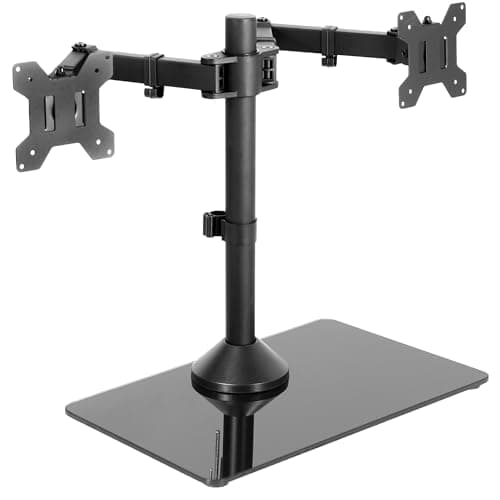
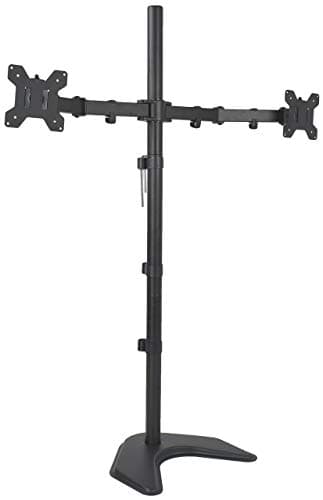
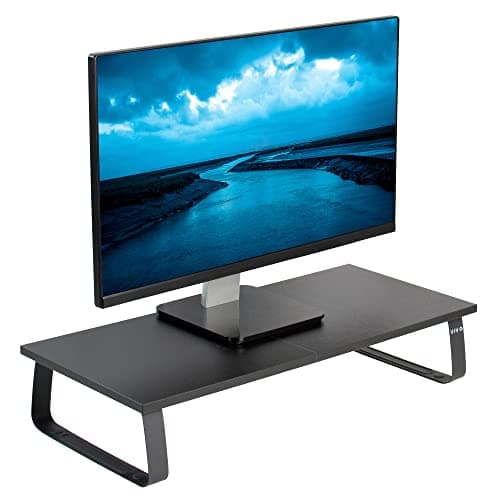
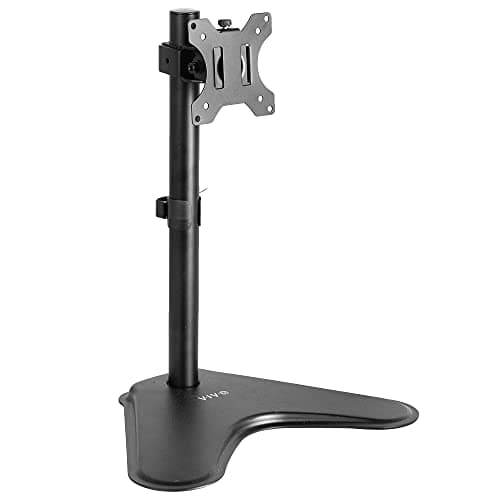
If your desk has a clear, solid clamp edge, buy a clamped arm instead — it frees the whole desk surface and anchors the screen's weight to the stiffest part of the top. If it does not, the VIVO STAND-V001H is the stand to buy: 22 lb of capacity, an 18-inch pole, a weighted steel base, and support for screens up to 32 inches or a 38-inch ultrawide. For two screens on one base the STAND-V002FG adds ±90° of tilt inside a 33-inch arm span. If you are tall and the standard pole runs short, the STAND-V012F's 40-inch pole is the only one here that will not. And if your monitor has no VESA holes, a plain 44 lb riser shelf is the only option that works at all.
A stand or an arm
This page has to start with an argument against itself, because the honest answer for most readers is the other product. A clamped monitor arm beats a stand on almost every axis that matters: it frees the desk surface completely, it pushes the screen back over the edge of the top instead of forward into your face, and it transfers the load to the stiff edge of the desktop rather than the middle. Our monitor arm ranking is where most people should go.
But read the disqualifier on that page's own winner. The Ergotron LX is ruled out if your desktop is under about 0.6 inches thick or has no clear clamp edge — and that describes a real slice of desks, including several we recommend. Here is the full list of situations where a stand is not a compromise but the only workable answer:
- A glass or acrylic desktop. Clamping a cantilevered arm to tempered glass is how glass gets replaced.
- A top under about 0.6 inches. The clamp will flex the top before it grips it, and you will chase that movement forever.
- No clear rear edge. A modesty panel, a cable tray, a wall return or a desk pushed flush against a wall can all leave nothing to clamp onto.
- A rented desk, or a rented room. Grommet mounting means drilling. A clamp leaves marks on a soft or veneered top.
- A monitor with no VESA holes. This one defeats arms and VESA stands alike, and leaves a riser shelf as the only option.
- A screen heavier than the arm takes. The LX stops at 26 lb. A riser shelf takes 44.
If none of those apply to you, close this page and buy an arm. If one does, the rest of this page is the real decision.
Three different things called a stand
The search term "monitor stand" covers three products that solve different problems and are not substitutes for each other. Buying the wrong one of the three is the most common way this purchase goes wrong.
|
| Riser shelf | Lifts the monitor on its own factory stand, frees the space underneath | Fixed | No |
| Freestanding VESA stand | Bolts to the back of the screen, pole on a weighted base | Adjustable on the pole | Yes |
| Clamped arm | Bolts to the screen, clamps to the desk edge, floats the screen | Adjustable, and it moves | Yes |
A riser shelf is a box. It raises the screen by a fixed amount and gives you the space underneath — which is where a keyboard goes, and that is genuinely useful on a shallow top. It cannot be adjusted after assembly and it does not change your tilt, swivel or rotation, because the monitor is still sitting on whatever stand it shipped with.
A freestanding VESA stand replaces the factory stand entirely. The screen bolts to a pole on a weighted base, which means you get real height adjustment, tilt and rotation without touching the edge of the desk. This is the category that actually competes with an arm, and it is where three of our four picks sit.
A clamped arm is the third thing, and it is covered elsewhere. The one number worth carrying over: an arm holds the screen out over the back edge of the desk, which reclaims several inches of depth that a base-mounted stand consumes.
Your eye line decides it, not the screen
The measurement to take before you shop
Sit at your desk in your normal posture and look straight ahead. The top of the screen should land at or just below that line. Now stand the desk up and check again — if the answer changes, the problem is your desk height, not your monitor height, and a stand will not fix it.
Run the calculator first.
This is the step people skip, and it is why monitor stands get returned. The screen height you need is a function of your seated eye level, your desk height and the panel's own dimensions — not of how tall the stand can go. On a sit-stand desk you have a real advantage here: the desk moves, so the screen moves with it, and a correct relationship set once holds in both positions.
What that means in practice is that most people need less lift than they think, and the 4.6-inch shelf on a fixed riser is often exactly right. The people who need a tall pole are the ones whose desk sits low relative to their eye line — tall users on a desk that bottoms out high, or anyone running a stacked second screen above the primary. That is the entire case for the 40-inch pole on the STAND-V012F, and it is a narrow case rather than a general upgrade.
One warning specific to risers: a shelf raises the screen without moving it backward. If your desktop is 27.5 inches deep — which two of the four desks on our under-$700 ranking are — lifting a 27-inch monitor on a shelf can put the panel closer to your face than comfortable viewing distance allows. Depth and height are the same problem seen from two angles.
Capacity, where the riser wins
This is the one spec where the dumbest product on the page beats everything else, and it beats them by a wide margin.
|
| VIVO STAND-V000D riser | 44 lb | Essentially any desktop monitor, VESA or not |
| Ergotron LX arm (for reference) | 26 lb | A 34" ultrawide with margin |
| VIVO STAND-V001H | 22 lb | Most 27" panels and many 32" ones |
| VIVO STAND-V002FG | 22 lb per monitor | Two 27" or 32" screens |
| VIVO STAND-V012F | 22 lb per monitor | Two screens, 13" to 27" only |
Two things fall out of that table. The first is that a riser shelf is the answer for a genuinely heavy screen — a large VA panel, an old 32-inch display, a monitor with a built-in speaker bar and a hub. Nothing else here is close.
The second is that 22 lb is the real ceiling for the VESA stands, and it does not rise with the price inside this family. If your screen is over 22 lb and does have VESA holes, you have left the stand category and should be reading about single versus dual clamped arms, where the published figures go higher and the load goes somewhere better.
Check your own monitor's weight before you shop, and check the panel weight rather than the shipping weight. A 27-inch IPS monitor is commonly 9 to 14 lb without its stand; a 32-inch is commonly 15 to 22 lb. That puts a lot of 32-inch screens right at the edge of every VESA stand on this page.
What a stand costs on a desk that moves
Every stand here has the same structural disadvantage on a sit-stand desk, and no review that ignores it is being straight with you: the load lands in the middle.
On a two-leg frame the legs sit inboard of the desktop ends, which leaves several feet of top bridging the gap between them with nothing underneath. A base-mounted stand puts a screen, a pole and a weighted plate right in the center of that span — the single worst place for it. A clamped arm puts the same weight on the back edge, where the top is stiffest and closest to a leg.
The consequence is movement rather than failure. Lean on the front edge of a wide desk with a stand in the middle of it and the whole deck behaves like a longer lever. Our wobble checklist covers the fixes, and the stability guide works through exactly how much a clamped arm helps and how much it does not. The honest summary for this page: if wobble is already annoying you, adding a stand will not improve it, and may be the thing you notice.
The second sit-stand cost is cables. A desk that travels roughly two feet several times a day drags every cable with it, and a stand with no routing adds two more loose runs to whatever is already back there. The STAND-V012F is the only pick here with integrated cable management; the cable management guide covers the twenty-dollar fix for the rest.
The four, against each other
|
| STAND-V001H | One, up to 32" or 38" ultrawide | 18" | 15.5" x 11" | ±15° |
| STAND-V002FG | Two, up to 32" each | 17" | 16.75" x 10.25" | ±90° |
| STAND-V012F | Two, 13" to 27" | 40" | Not published | ±45° |
| STAND-V000D riser | One, no VESA required | Fixed 4.6" shelf | 23.8" x 10.3" | None |
Read the base dimensions column as a cost, not a feature. A 15.5 by 11 inch footprint is roughly a third of the depth of a 27.5-inch desktop, and it sits exactly where a keyboard and your forearms want to be. The riser is the opposite trade: a larger footprint that you get to use, because the whole point is the space underneath it.
The tilt column is where the dual stand surprises people. The single STAND-V001H publishes ±15°, which is enough for a screen at eye level and not enough for one you have raised above it. The STAND-V002FG publishes ±90°, which is why it works for a stacked pair where the top screen has to angle down toward you.
Why this list is mostly one brand
Three of the four picks and all four of the ranked models are VIVO, and we are not going to pretend that is a coincidence or dress it up as a verdict about quality.
The reason is documentation. This site will not print a specification it cannot cite, and in the monitor stand category VIVO is close to the only maker that publishes dimensions, weight capacity, pole height, articulation angles and a warranty term for every SKU on its own site. The rest of the category on Amazon is largely unbranded or thinly-branded product with the capacity stated in the listing title and nothing behind it. We can cite a title, but a title is not a specification sheet, and a stand whose maker will not state what it carries is not something we can rank against one whose maker will.
That is a limitation of this page rather than a recommendation. If a second maker in this category starts publishing proper figures, the ranking will change. For now, the brand concentration is the honest consequence of the sourcing rule, and you should read it that way.
What we left out, and why
Clamped arms. Not ranked here because they are a different product with their own page, and because for most desks they are the better answer. The arm ranking exists for exactly that reason. If you are undecided, the deciding question is whether your desktop has a clear edge over about 0.6 inches thick.
The Ergotron Neo-Flex stand. Ergotron makes the best arms we know of, and it also sells a desk-mounted Neo-Flex monitor stand. We are not ranking it, for one reason: the figures we could independently verify are a 27-inch screen cap and a 6 to 16 lb weight window, which is a narrower and lower load range than the VIVO stands at a higher price, and we could not verify its height-adjustment range from Ergotron's own published page at the time of writing. Rather than rank a product on a partial spec sheet, we left it off and said so.
Monitor risers with built-in drawers. The Amazon category is full of them and several are cheap and in stock. None of the ones we looked at publish a weight capacity from an identifiable maker, which means the one number that decides whether your monitor is safe on the shelf is the one nobody will state. A drawer is not worth that.
Laptop stands. A different product solving a different problem, and mostly a bad answer on a standing desk — raising a laptop raises its keyboard with it. That is the whole argument for a converter with a separate keyboard deck instead.
VIVO's other lengths and finishes. The riser we rank is the 24-inch V000D; VIVO publishes 15-inch, 39.4-inch and 55-inch versions of the same shelf, plus wood-finish variants. Those are configuration choices on one product rather than separate recommendations, so we rank the one and point at the range.
Nothing on this page has been used by anyone here. Every figure above is VIVO's or the retailer's published specification, with the page it came from cited below, and the Ergotron capacity quoted for comparison comes from Ergotron's own LX documentation.