The short answer
Under $100 the honest answer is that you are buying a freestanding pole mount rather than a gas-spring clamp arm — the established clamp arms start well above the cap. That is not a downgrade for everyone: a pole mount works on a glass top, a thin top or a desk you are not allowed to drill, and it carries the same 22 lb most mid-range arms do. The VIVO STAND-V001H is the single-screen pick at 22 lb on an 18" pole, the STAND-V002FG puts two screens on one base, the STAND-V012F is the one with a 40" pole if you need real height, and the STAND-V000D riser is the answer if your monitor has no VESA holes at all. Prices move; the buttons below read live.
What $100 actually buys
Start with the thing the category pages tend to bury. The monitor arms most people picture — a clamped base, a gas spring, an arm you push with one finger and it stays — are not a sub-$100 product from the makers worth buying. Ergotron's LX, the arm this site ranks first overall, lists at a price comfortably above the cap on this page. That is the premium for the spring mechanism and the warranty behind it.
What you can buy under $100 is a pole mount: a weighted or clamped vertical pole with a VESA head that slides up and down it, tilts, swivels and rotates. You set the height once with a hand screw rather than nudging it through the day. For a desk that is set up once and left, that difference matters a great deal less than the price gap suggests.
The trade, in one line
A gas-spring arm is re-adjusted with one finger, several times a day. A pole mount is adjusted deliberately, with a screwdriver or a hand knob, and then left. If you set your screen height once and never touch it, the cheaper mount costs you nothing you were going to use.
There is also a real advantage hiding in the cheaper category: every mount on this page is freestanding. It needs no clamp edge. A glass desktop, a top thinner than most clamps allow, a rented desk you cannot drill, or a rear edge blocked by a cable tray all rule out a clamp arm and none of them rule out a pole on a weighted base. If that is your desk, the cap is not the reason you are here — the mount type is.
How these are ranked
The same four criteria the rest of this hub uses, weighted the same way, so a mount cannot score well here and badly on the main arms ranking:
- Load capacity against the real weight of your panel. A 27-inch IPS monitor without its factory stand is commonly in the 10 to 15 lb range; a 32-inch or a curved ultrawide can be well past that. Every mount on this page publishes a figure.
- Height reach. The pole length caps how high the screen goes. This is the criterion that separates the four products below more than any other, and it is the one buyers check last. The height calculator gives you a floor-to-screen-top target to check a pole against before you order.
- Adjustability. Tilt, swivel, rotation, and whether a second screen can be angled independently.
- Warranty. Three years across this field, which is the category norm at this price and well short of what the premium arms carry.
Check VESA before anything else
Three of the four picks below bolt to the four VESA holes on the back of your monitor. Most monitors have them in a 75x75mm or 100x100mm pattern; some consumer panels, particularly thin all-in-one designs and a number of popular 24-inch models, have none at all. If yours is one of those, the first three products on this page cannot mount it, and that is not a thing an adapter reliably fixes.
The riser is the answer in that case — the monitor keeps its own factory stand and the whole thing sits on a shelf. It is also the answer if your screen is heavier than 22 lb, because 44 lb on a fixed shelf is more capacity than any arm this site ranks. Arm versus stand, in full works through the decision properly.
The four, one at a time
1. VIVO STAND-V001H — best single screen
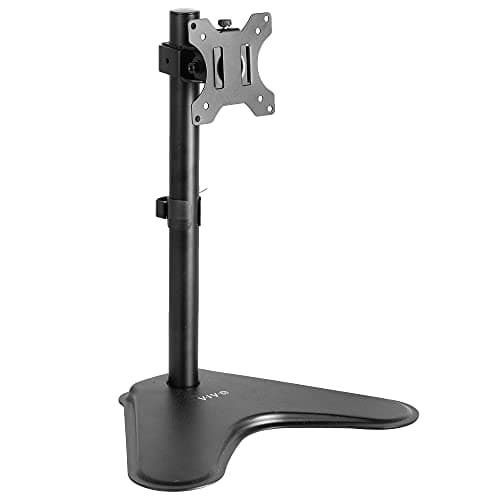
The default answer under the cap. VIVO publishes 22 lb of capacity on an 18-inch pole with a 15.5" x 11" weighted base, +15° to -15° of tilt, 90° of swivel, 360° of rotation and height adjustment along the pole, behind a three-year warranty. The listing supports screens up to 32" standard or 38" ultrawide — and a 38-inch ultrawide is more than several clamp arms at twice the price will take.
The honest cons. The base occupies desk space a clamp arm would have freed — that is the whole bargain of a freestanding mount. The 18-inch pole is the shortest here, so a tall user working seated at a high desk should check the arithmetic before ordering. And ±15° of tilt is modest next to the V002FG's ±90°.
2. VIVO STAND-V002FG — best for two screens
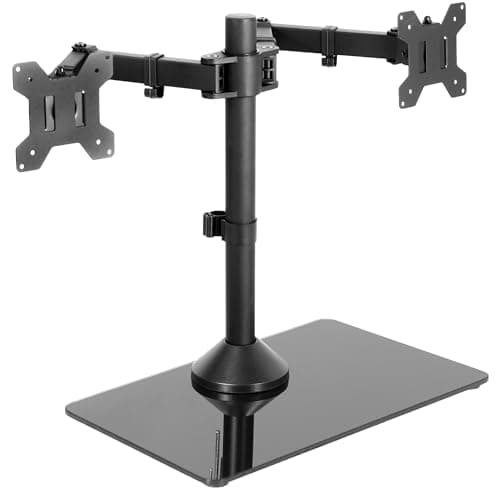
Two monitors on one tempered-glass base, 22 lb each rather than a halved budget, with a 17" pole, a 33" arm span, +90° to -90° of tilt, 360° swivel and 360° rotation. That tilt range is the most articulation on this page by a distance and it is what makes a second screen genuinely viewable rather than merely mounted. One base for two screens also costs one footprint instead of two.
The honest cons. The 17" pole is the shortest here, which with two heads on it is the real constraint. VIVO specifies screens up to 32" each with a maximum VESA pattern of 100x100mm, and the 33" arm span is a hard ceiling on how far apart the two can sit. Beyond that, a pair of single mounts fits better.
3. VIVO STAND-V012F — best reach
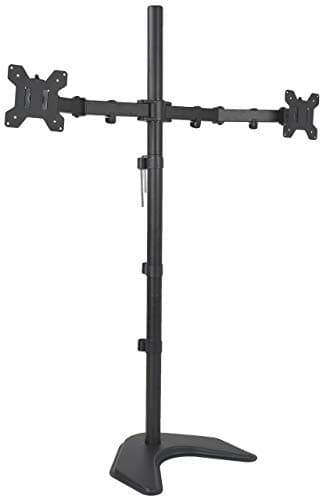
A 40-inch pole, which is more than double the standard single stand's 18 inches and the only thing on this page that will not run out of height. 22 lb per monitor, two screens stacked or side by side, -45° to +45° of tilt, 360° swivel and rotation, integrated cable management and a three-year warranty. If the problem you are solving is a screen that sits too low even at the top of a normal mount, this is the product.
The honest cons. VIVO specifies it for screens from 13" to 27", so a 32-inch panel sits outside the stated range even though the weight rating would carry it. A 40-inch pole on a desk also needs the headroom above the desk to exist — check a shelf or a low ceiling before ordering. It is the most expensive pick here and still under the cap.
4. VIVO STAND-V000D riser — best if your monitor has no VESA holes
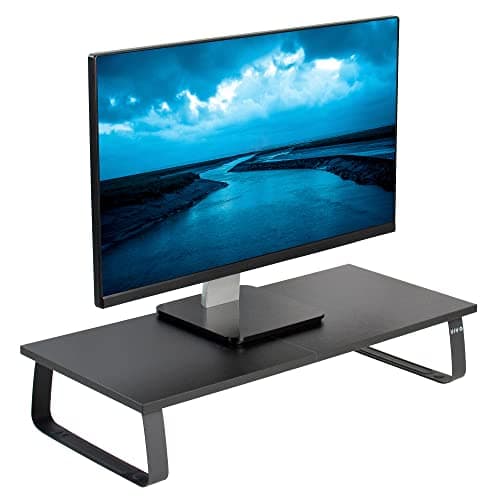
Not an arm at all, and on this page deliberately. A 23.8" x 10.3" x 4.6" shelf on four legs, rated to 44 lb — nearly double what the VESA mounts here take and well above any arm this site ranks — in particle board and steel with anti-slip silicone padding and a three-year warranty. The monitor keeps its factory stand and sits on top, and you get the space underneath back for a keyboard.
The honest cons. It is a fixed height. The shelf corrects an eye line by about 4.6 inches and cannot be re-tuned afterwards, so measure the gap you are closing before you order — if you need six inches, this is not the product. There is no tilt, no swivel and no rotation, and it does not free the desk surface the way a mount does.
The four, measured
|
| VIVO STAND-V001H | 22 lb | 18" pole | ±15° tilt, 90° swivel, 360° rotation |
| VIVO STAND-V002FG | 22 lb per monitor | 17" pole, 33" arm span | ±90° tilt, 360° swivel, 360° rotation |
| VIVO STAND-V012F | 22 lb per monitor | 40" pole | ±45° tilt, 360° swivel, 360° rotation |
| VIVO STAND-V000D riser | 44 lb | 4.6" fixed shelf | None — it is a shelf |
| Ergotron LX (over the cap) | 26 lb | 13" of lift | Constant-force spring arm, clamp or grommet mount |
Read that as three different jobs. Most desks want the V001H. Two screens want the V002FG unless they need to sit further apart than 33 inches. A screen that still sits too low at the top of a normal pole wants the V012F, and a monitor with no VESA holes wants the riser.
What the money above $100 buys
Worth saying plainly, because the step up is real and this page should not pretend otherwise. The Ergotron LX is the arm we rank first overall: a constant-force spring with 13 inches of lift and a 26 lb capacity, on a clamp or grommet mount that frees the desk surface entirely. You move it with one hand and it holds position instead of drooping in month four, and Ergotron backs it for ten years rather than three.
The question is whether you will use that. If your screen height is a set-and-forget decision — and for most people at a sit-stand desk it is, because the screen moves with the desk anyway — the spring is a convenience you are paying a premium for. What actually makes a mount feel solid covers the part that is not on any spec sheet, and LX versus LX Dual is the comparison to run if you have already decided to spend up.
What to avoid at this price
Three things, and all three are common under $100:
- A capacity figure with no source. Every mount on this page publishes a weight rating on the maker's own site. A listing that states a number only in the marketing image is not a specification.
- A gas spring at a price a gas spring cannot be made for. The spring is the expensive part. Under the cap, a mount advertising one is advertising a weak one, and a sagging arm is worse than a fixed pole because it moves when you do not want it to.
- A clamp with no stated desk-thickness range. Clamps have a minimum and a maximum top thickness, and a mount that does not publish them is a returns risk on any desk that is not 1 inch thick.
If what you actually need is the whole desk tidied rather than the screen lifted, the accessories ranking covers the rest of the surface, and the full monitor stands ranking goes deeper on this same family without the price cap.