The short answer
A converter is worth it when your existing desk is at a correct seated height, you have at least about 26 inches of desk depth, and the stuff you work on weighs less than about 30 pounds. Under those conditions it is the best value in this whole category: a genuine standing position for a fraction of a desk, with your seated position untouched because it is still your own desk. It stops being worth it when the desk is too shallow, the load is too heavy, or you are tall — at which point a clamp-mounted unit or a real sit-stand desk is the answer. The VariDesk Pro Plus 36 is the converter we would buy, the VIVO 36-inch is the value pick, and the Ergotron WorkFit-S is the one that takes no desktop footprint at all.
The short version
Most of the internet treats a converter as the compromise option — the thing you buy when you cannot afford a desk. That framing is wrong in one important way: a converter does one thing better than any sit-stand desk, not just cheaper.
Your existing desk is almost certainly at a fine seated height. Most fixed desks are built around 29 to 30 inches, which is a touch high for shorter users and correct for many people. A converter leaves that alone and adds a second position on top. A cheap sit-stand desk, by contrast, often takes away the good seated position: two-stage frames commonly have floors around 29 inches before you add a desktop, which is why the sub-$200 desk market is a trap and why the leg-stage question matters so much.
So the real comparison is not "good desk versus converter". It is "good desk versus converter versus cheap desk" — and the converter beats the cheap desk on the thing that matters.
What a converter does better
- It keeps your seated position. Covered above, and it is the strongest argument in the category.
- It does not require you to own the furniture. Renting, hot-desking, sharing a dining table, in an office where IT owns the desk — a converter goes on top and comes off again. Nothing else in sit-stand works this way.
- It has almost nothing to fail. A spring-assisted converter has no motor, no control box and no hand switch, which are precisely the three things that fail on electric desks and precisely what the short clause in most desk warranties carves out. Vari covers the Pro Plus 36 with a lifetime warranty, which is a claim no electric desk at any price matches on the electronics.
- It is reversible. If standing turns out not to suit you, you have a converter to sell and your desk back. That is a much smaller bet than a desk purchase, and it is the right bet if you are genuinely unsure.
The three real costs
- Desk depth, permanently. A converter sits on your desk and occupies it. The VIVO 36-inch unit is 22 inches deep; Vari recommends a 25.75-inch-deep desk for the Pro Plus 36 to reach its full 17.5 inches of lift. On a 24-inch desk, a 22-inch converter leaves you two inches of desk. This is the number that disqualifies converters most often, and it cannot be worked around.
- Load capacity, as a hard limit. Desk capacity ratings are margin questions. Converter ratings are limits. The VIVO 36 takes up to 33 lb on the platform; the WorkFit-S states a maximum total load on the height-adjustment assembly of 24 lb for the single-monitor model and 25 lb for the dual. A 27-inch monitor on its factory stand, a laptop and a dock can reach that. Two large monitors on stands usually exceed it.
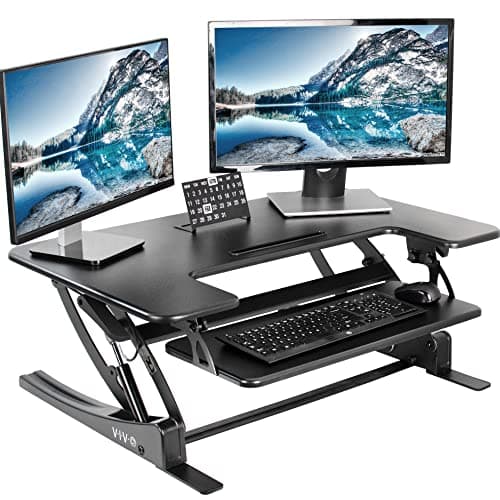
- The keyboard problem, if you pick wrong. A converter that lifts only your screen leaves your keyboard at seated height, which means typing with raised shoulders for hours. Every converter worth buying has a keyboard tray that rises with the top — the VIVO 36 pairs its 36 by 22 inch surface with a 25.2 by 10.6 inch tray. A unit without one is a monitor stand being sold as a converter.
The one measurement that settles it
Desk depth. Thirty inches is comfortable with a converter on it. Twenty-six is workable and is roughly what Vari asks for. Twenty-four is tight. Under 24 inches, a desktop converter will overhang the front edge, which is unusable and genuinely unsafe with weight on it — and the way out is a clamp-mounted unit with zero desktop footprint, not a smaller converter.
Four measurements before you buy
- Desk depth. Front edge to back wall. See above.
- Vertical clearance above the desk. A shelf, a cabinet, a window header or a low ceiling slope that sits under about 20 inches above the desktop will stop the converter before it reaches your standing height. Vari is explicit that the Pro Plus 36 needs the clearance to rise 17.5 inches.
- Your standing elbow height, minus your desk height. That difference is the lift you need. Get the standing number from the height calculator, subtract your desk height, and compare the result with the converter's published range. If the number comes out above about 17 inches, most desktop converters will not reach you — the tall-user ranking is the page you need, and the WorkFit-S is on it because it adjusts a monitor through up to 23 inches.
- The weight of everything going on it. Monitor, laptop, dock, keyboard, mouse, speakers. Add it up and compare it with the platform rating, not the total product weight rating.
From the picks
The three converters we'd actually buy
One lifetime-warranty spring unit, one value pick wide enough for two screens, and one clamp-mounted unit that takes no desktop footprint at all.
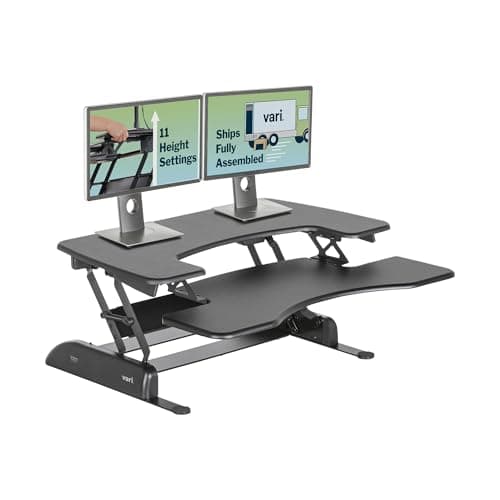
The converter everyone else is measured against: spring-assisted, arrives assembled, lifetime warranty. It rises 17.5", which is enough for most people at a 29" desk and not enough above about 6'2".
Best for dual monitors on a budget
A wide two-tier platform with the most usable surface per dollar in this category. The 33 lb lift limit is the thing to check against your actual monitors before you order.
Best for tall users and zero desk footprint
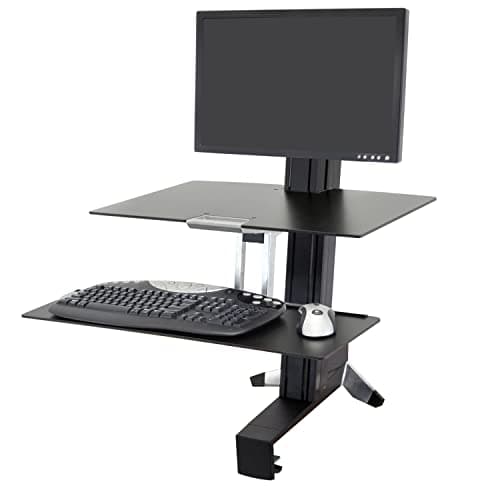
A clamp-on arm rather than a platform, so it takes no desk depth at all and lets the monitor move independently of the keyboard. For tall users that independence is the whole argument.
The three routes, compared
|
| Seated position | Your existing desk, unchanged | Often lost — floors of 28.7" to 29.5" are common | Genuinely low — 22.6" to 23.6" on the frames we rank |
| Standing position | Up to 17" – 17.5" of lift above your desk | Yes | Yes, with headroom |
| Desk depth consumed | About 22 inches of it | None | None |
| Load limit | 24 – 33 lb, a hard ceiling | 220 lb, a margin question | 330 – 355 lb |
| What can fail | A gas spring | Motor, control box, hand switch | Same, under a 15-year clause naming electronics |
| Reversible | Yes — take it off the desk | No | No |
Read the first row as the whole argument. The converter and the good desk both give you two usable positions. The cheap desk frequently gives you one, and it charges more than the converter to do it. The $400 page works through which cheap desks escape that problem — it is one of three.
When it is a clear yes
- You have a deep desk you like. A 30-inch-deep desk and a converter is a genuinely excellent setup, and cheaper than any desk we rank.
- You do not own the desk. Rented, shared, employer-owned. There is no alternative, so the question answers itself.
- You are not sure standing suits you. The converter is the cheap experiment. Run it for a month and you will know, and the answer is worth far more than the price difference.
- One screen and a laptop. Comfortably inside every load rating, which is where converters are happiest. The laptop ranking covers that case specifically.
When to buy a desk instead
- Your desk is under about 26 inches deep. The measurement decides it.
- Two large monitors are going on it. You will be at or over the platform rating, and the geometry gets worse as well as the weight — screens on a converter are closer to your face than they should be. The dual-monitor converter ranking handles the cases that do work, and the two-monitor desk ranking explains why depth decides a two-screen setup.
- Your existing desk is at the wrong seated height. A converter inherits whatever is underneath it. If the seated position is already wrong, the converter preserves the problem and adds a second one.
- You need more than about 17 inches of lift. Taller users run out of desktop converter before they run out of height. That ranking exists because of it.
- You want a walking pad. A pad needs a desk that goes high enough with four to six inches under your feet, which is not something a converter on a fixed desk can do. Whether a pad is worth it at all is worth settling first.
If the answer turns out to be a desk, the choosing guide is the fastest route to a shortlist, and the full route-versus-route comparison is the longer version of this page.
One disclosure specific to this page: nobody here has lived with a converter. The single product this site has long-term experience of is an UPLIFT V2 desk. Every figure above is the maker's published specification, cited below, and the full method is published.