The short answer
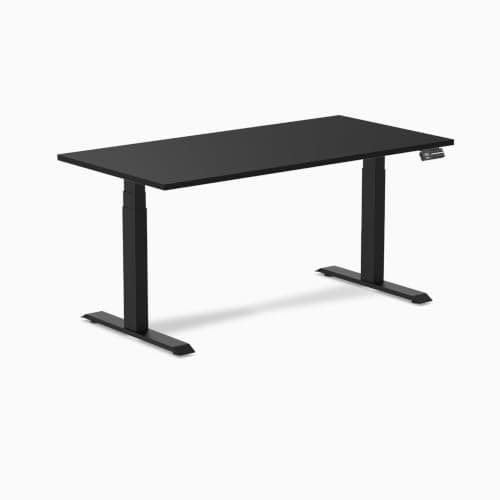
The Desky Dual is a well-specified three-stage desk with an unusually wide travel range — 23.6" to 49.2" on two concealed motors — four memory presets, anti-collision, a published 40 db noise level and a ten-year warranty on the frame. Two things deserve more care than the marketing gives them. First, the headline 330.7 lb capacity is stated by Desky as the total including the desktop, which is not how most desk makers quote it, so the load left over for your monitors and gear is lower than the number suggests. Second, Desky's US and Canadian stores publish different figures for the same desk — 330.7 lb and 1.6" per second in the US, 308.6 lb and 1.4" per second in Canada. Nobody here has used this desk. Every figure below is Desky's own published specification or a fact stated on the live Amazon listing, both cited at the foot of this page, and availability was confirmed before this review was written.
The short verdict
Desky is not a household name in the US the way UPLIFT and FlexiSpot are, and that is most of why this review exists — people are searching the brand and finding marketing copy rather than a spec reading. On the specifications, the Dual earns the attention: the height range is at the top of what this category offers, the leg construction is the better of the two options makers use, and ten years is a long warranty in this price band.
What it does not come with is a published stability figure, and what it does come with is a capacity claim that needs translating. Both of those are covered below, because a review that lists the good specs and skips the awkward ones is an advertisement.
The published numbers
|
| Height range | Dual motors, 23.6" to 49.2" |
| Weight capacity | Supports up to 330.7 lb total, including the desktop |
| Legs | Three-stage telescopic |
| Travel speed | 1.6" per second loaded |
| Noise | 40 db |
| Controller | Four memory presets; anti-collision |
| Frame weight | 79.4 lb gross, without the desktop |
| Desktop | 1" thick laminate in 47.2, 59.1, 70.9 and 78.7 x 29.5 inch sizes, with or without grommets |
| Frame colors | White, matte black, space gray and gray |
| Warranty | 10 years on the Dual frame |
The configuration we link on Amazon is the 59.1" black laminate top on a matte black frame — the middle size, and the one most buyers will want unless the room dictates otherwise.
Three-stage legs, and what they buy you
This is the most consequential spec on the sheet and the one buyers skip, so it is worth a paragraph of mechanism.
Stages are telescoping segments, and more is better
A two-stage leg has two sliding segments; a three-stage leg has three. More segments means more total travel out of the same collapsed length — so the desk both drops lower and rises higher — and it means the desk reaches a given height with less of each segment extended, which generally helps rigidity at full stand.
The payoff shows up directly in the range: 23.6" to 49.2" is 25.6 inches of travel, which is wide. For comparison, an UPLIFT V3 frame drops to 22.6" and a Secretlab MAGNUS Pro stops at 25.6" — and the floor matters as much as the ceiling, because a desk that will not come down to your seated elbow height is the wrong desk no matter how high it goes. The full two-stage versus three-stage comparison works through the trade-offs, including the ones that favor two-stage.
Run your own numbers before you buy either way. The height calculator produces your seated and standing figures, and the only question that matters is whether this desk's range contains both of them.
The capacity figure, read carefully
Desky's US frame page states it plainly: "Supports up to 330.7 lbs total, including the desktop." Read that sentence twice, because it is doing something unusual.
Most desk makers quote a lifting capacity for the frame, and the desktop is treated as part of the apparatus rather than part of the load. FlexiSpot, for instance, publishes 220 lb on the E6 and 330 lb on the E6 Pro as frame ratings. Desky's number is a total — so a solid-wood or large laminate top comes out of your 330.7 lb before a single monitor goes on it.
How much does that cost you in practice? Desky does not publish desktop weights on the pages cited here, so we are not going to estimate one — that would be exactly the kind of invented figure this site exists to avoid. What we can say is the direction: the usable load for monitors, a PC, an ultrawide arm and everything else is meaningfully lower than 330.7 lb, and if you are specifying a heavy setup you should ask Desky for the weight of the specific top you are ordering before you rely on the headline.
To be clear, this is not Desky behaving badly — stating a total is arguably the more honest convention, because it is the number the frame actually has to lift. It just is not the convention the rest of the category uses, which makes it look like a bigger number than it is when you line it up against a competitor's frame rating. How desk weight capacity is actually measured goes through the whole mess, including static versus lifting ratings.
Two stores, two spec sheets
Something came up during research that belongs in the review rather than in a footnote. Desky operates separate regional stores, and they do not agree about this desk.
- Desky's US store publishes 330.7 lb total capacity and a travel speed of 1.6" per second loaded.
- Desky's Canadian store publishes "up to 308.6 lbs" and a movement speed of 1.4" per second, across the same 23.6" to 49.2" range.
Those are not rounding differences. It is possible they reflect different regional hardware, different certification regimes, or simply one page being older than the other. We do not know which, and we are not going to guess.
What we have done is use the US figures throughout, because this site serves US buyers and the US store is the one selling into this market. But a buyer should know the discrepancy exists, because "the maker publishes two different capacities for the same product" is a legitimate thing to weigh against a brand, and it is the kind of detail that would never show up in a review written from the Amazon listing alone.
Ten years, and what it does not say
Desky publishes a ten-year warranty on the Dual frame. That is long — longer than most of this category, and a real statement about the motors and the leg assemblies, which are the parts that fail.
Read it the way we read every desk warranty on this site: scope before length. Ten years covering the frame is excellent. What the sources we cite do not state is whether labor is included, how the desktop is covered as opposed to the frame, or what the claims process looks like for a desk shipped flat to a US address. Those are the questions to put to Desky before you order, and the absence of an answer here is a gap in their published material rather than a judgment about the desk.
The desktop, and which size to order
The laminate top is 1" thick and comes in four widths — 47.2", 59.1", 70.9" and 78.7" — all at 29.5" deep, each available with or without grommets. Four sizes is more choice than most makers offer, and it means the desk can be sized to the room rather than the room arranged around the desk.
Two notes on choosing. The 29.5" depth is generous — deeper than many competitors — and depth is what decides whether a monitor sits far enough away to be comfortable without a monitor arm. And the grommet option is worth thinking about before you click, because drilling a 1" laminate top yourself after the fact is not a pleasant afternoon; the cable guide explains what the holes are for and whether you need them.
If you are not sure which width you need, the size guide works from the room and the monitors backward, and the honest answer for most single-monitor setups is that 59.1" is plenty.
The honest case against it
- No published wobble or deflection figure. This is the specification that decides whether a desk is pleasant at full standing height, and almost nobody in the category publishes it — Desky included. That means stability cannot be checked from the spec sheet, which on a three-stage frame is where you would most want to check it. What actually causes wobble, and the fixes is the page to read if this is your main worry.
- The capacity convention is non-standard. Covered above. Not dishonest, but it makes direct comparison with a competitor's frame rating misleading unless you do the subtraction.
- Two spec sheets. Also covered above. A maker whose own regional stores disagree on capacity and speed is a maker whose figures you should verify at the point of purchase.
- Brand presence in the US is thin. Parts availability and service responsiveness are harder to assess for a brand without a long US track record than for one with a decade of it. That is a risk rather than a fault, and a ten-year warranty is only worth what the company behind it is worth.
- It will not go below 23.6". That is a good floor, but it is not the lowest available, and if your seated elbow height needs less than that, a converter on an existing low desk is the cheaper fix — the desk-versus-converter comparison lays out when that is the right call.
Who should buy it
Buy it if you want three-stage legs and the wide range that comes with them, if a ten-year frame warranty matters to you, if you want to pick a desktop width rather than accept one, or if 29.5" of depth solves a monitor-distance problem you currently have.
Think twice if you are specifying a heavy multi-monitor and desktop-PC setup — ask for the weight of your chosen top and do the subtraction first — or if brand track record and a clearly documented US claims process are things you weigh heavily.
Look elsewhere if you need a desk that drops below 23.6", or if you would rather buy within the two brands this site has the most published data on. The main desk ranking is the place to start, and the UPLIFT versus FlexiSpot comparison covers the two desks most people are choosing between before they find Desky at all.
Once the desk is settled, the two purchases that change a sit-stand setup most are the chair and what goes under the desk: desk chairs ranked on published fit numbers and filing cabinets that clear a lowered desk.