The short answer
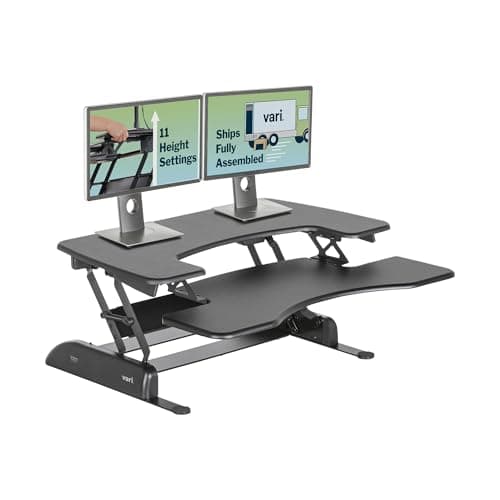
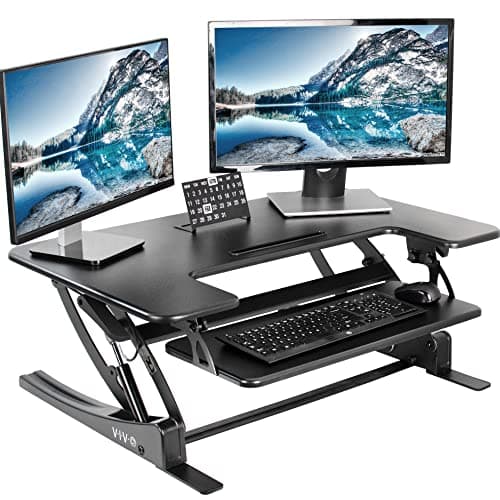
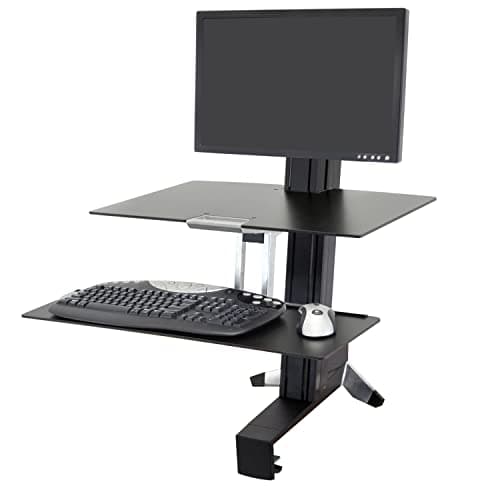
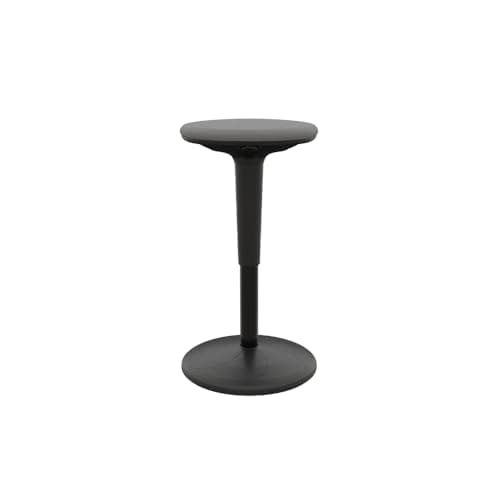
The best alternative to a standing desk is a converter that sits on the desk you already own: the VariDesk Pro Plus 36 rises 4.5 to 17.5 inches on a spring mechanism with a lifetime warranty, and the VIVO 36-inch is the wide two-tier option with 33 lb of platform capacity. If desk depth is the constraint, a VESA arm converter such as the Ergotron WorkFit-S takes no desk surface at all and moves the monitor independently of the keyboard, with 18 inches of tandem adjustment. The free alternative is a kitchen counter, which is within an inch or two of a standing desk height for most adults. And the alternative people forget is a perch stool — the Vari Balance Stool runs 22 to 29 inches — because the real goal is changing position, not standing still.
The short answer
Six alternatives, ordered roughly by what they cost, with what each one gives up:
|
| A counter or a high shelf | A standing workstation for nothing | Fixed height; no seated position at all |
| A fixed riser | Raises the screen, frees the space underneath | Nothing moves, so there is no standing position |
| A perch stool | A third position between sitting and standing | Not a desk, and not a full working day of seating |
| A spring converter | Lifts screen and keyboard together on your own desk | Eats desk depth; keyboard lives above the surface |
| A VESA arm converter | Zero desk footprint, independent monitor height | Needs a VESA screen and a clamp edge |
| A walking setup | Turns standing time into moving time | Needs floor space and a desk that clears your stride |
1. A desk converter
The main alternative, and the one most people mean. A platform sits on your existing desk and lifts your monitor and keyboard together.
The VariDesk Pro Plus 36 runs 4.5 to 17.5 inches of lift on a spring-assisted mechanism, arrives assembled and carries a lifetime warranty — Vari asks for a desk 25.75 inches deep to reach full height. The VIVO 36-inch is the wide option: a 36 by 22 inch top with a separate 25.2 by 10.6 inch keyboard tray, 33 lb of platform capacity and a three-year warranty.
The catches are real and the converter guide does not hide them: a platform occupies desk depth permanently, your keyboard sits above the desk surface even when you are seated, and most converters cap out below where a tall user needs to be. The tall-user converter ranking exists for exactly that reason.
2. A VESA arm converter
A clamp-on arm rather than a platform. The Ergotron WorkFit-S holds the monitor on a VESA mount and a keyboard on its own tray: the two adjust 18 inches in tandem, the monitor a further 5 inches independently, up to a 23-inch maximum monitor height. Total load on the height-adjustment assembly is 24 lb for the single-monitor model and 25 lb for the dual.
It is the only alternative here that costs you no desk surface at all, and the independent monitor movement is what makes it the pick for tall users. It needs two things most advice forgets to mention: a screen with a VESA interface, and a desk edge you are allowed to clamp to. An all-in-one machine without a VESA option rules it out — which is the whole subject of our iMac page.
3. A fixed riser
A shelf on four legs, and the highest-capacity thing in this list: the VIVO 24-inch riser takes 44 lb, which is more than any monitor arm we rank, with a 23.8 by 10.3 inch deck at 4.6 inches tall.
It is cheap, it never fails, and it is not a standing desk. It raises your screen to a better seated eye line and gives you the space underneath. If your actual problem is that your monitor is too low rather than that your desk is too low, the stand and riser ranking is the page you want, and the arm-versus-stand comparison will settle which type.
4. The counter you already own
Free, and the one we recommend trying before you spend anything. Kitchen counters and breakfast bars sit close to a standing desk height for an average adult, which makes them a week-long test of whether you will stand at all.
Do this before buying anything
Work out your own standing height —
the calculator produces it from your height — then measure your counter. If you are within an inch or two, work there for a week. People who find out this way that they stand for twenty minutes a day have saved themselves a desk.
The alternative that reframes the question. The point of a sit-stand desk is not standing, it is changing position — and a perch stool adds a third position without moving the desk at all.
The Vari Balance Stool runs 22 to 29 inches on a pneumatic lift, takes 275 lb and has a rounded base that rocks and pivots rather than locking you still. Paired with a counter or a converter at standing height, it covers the hours your legs are done. The stool ranking covers the field, and the chair-versus-stool page says plainly which one is a full working day — the stool is not.
6. A walking setup
If the reason you want a standing desk is movement rather than posture, the honest answer may be a walking pad — the evidence for movement is stronger than the evidence for standing still, and we go through what the research supports.
A pad needs a desk that clears your stride, which usually means it is a complement to a standing desk rather than an alternative to one. The walking-pad guide and the belt-length guide are the two pages to read before spending here.
From the picks
What we'd actually buy
The converter for most people, the wide platform for two screens, the arm for a tall user with a VESA monitor, and the stool that adds the third position.
The converter everyone else is measured against: spring-assisted, arrives assembled, lifetime warranty. It rises 17.5", which is enough for most people at a 29" desk and not enough above about 6'2".
Best for dual monitors on a budget
A wide two-tier platform with the most usable surface per dollar in this category. The 33 lb lift limit is the thing to check against your actual monitors before you order.
Best for tall users and zero desk footprint
A clamp-on arm rather than a platform, so it takes no desk depth at all and lets the monitor move independently of the keyboard. For tall users that independence is the whole argument.
A rounded base that rocks, tilts and pivots instead of locking you still, on a pneumatic lift that runs 22" to 29". It is a third position between sitting and standing, not a chair you work a full day in.
Which alternative for which problem
- Too expensive: the counter first, then a spring converter. See the cheapest-desk ladder.
- No room for a new desk: a converter or a VESA arm, since both use the desk you have.
- Renting, or not allowed to change the furniture: a converter, which leaves no marks, or a counter.
- Shallow desk: the VESA arm, which takes no depth. A converter needs about 26 inches of desk in front of it.
- Tall: the VESA arm, for the independent monitor height.
- Your legs, not your back, are the problem: the stool, plus a mat.
Three alternatives we do not recommend
A laptop on a stack of books. It raises the screen and leaves the keyboard at the same height, so you type with raised shoulders — the ergonomic problem a converter exists to avoid. Fine for an hour, not for a working week.
An ironing board. It appears in every list of improvised standing desks. It is narrow, light and unstable, and a monitor on one is a monitor on the floor eventually.
A fixed-height standing-only desk. Standing all day is its own problem, not a solution — the evidence points at alternating in blocks, which a desk with one height cannot do.